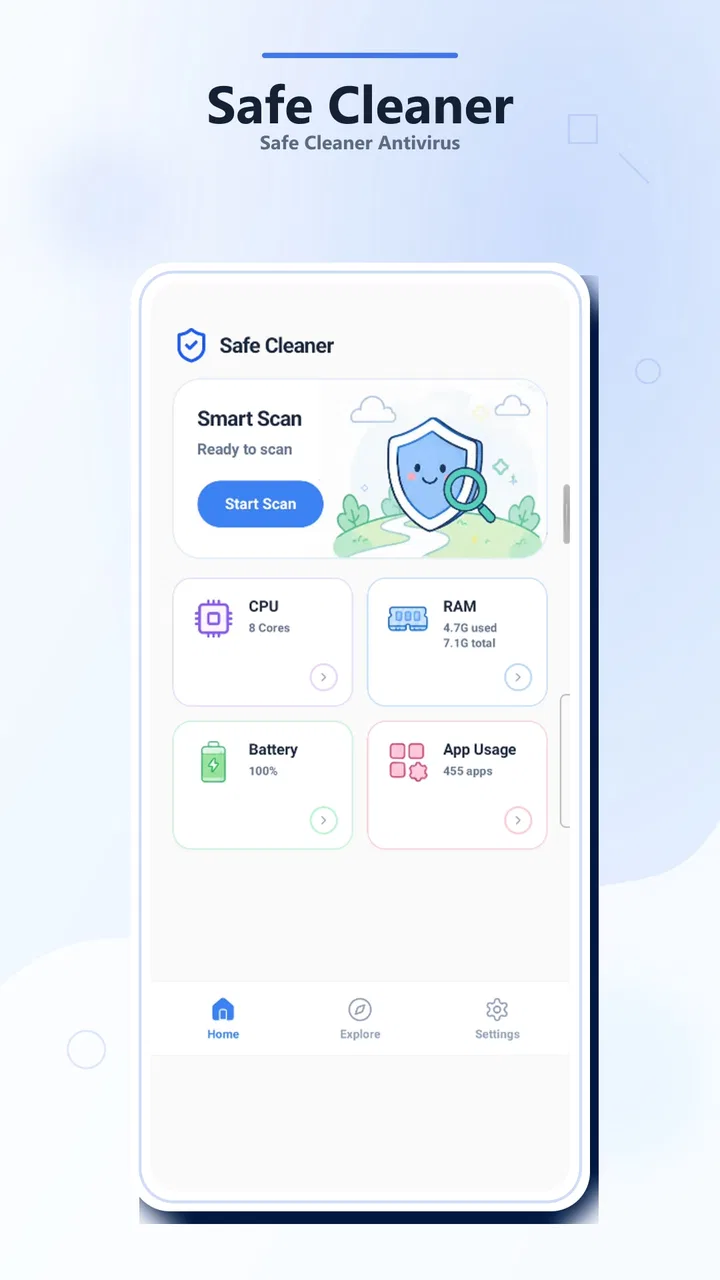
Safe Cleaner - Antivirus
- 4.3
- Rating
- 100.00K
- Installs
- Free
- Price

 Analysis by App-foxy
I approached Safe Cleaner - Antivirus as a practical tools app rather than a magic speed booster. Its purpose is straightforward: help me look for possible risks, understand what is occupying storage, and remove unnecessary files without turning routine maintenance into a technical project. That makes it appealing if you want a simple cleaning companion on an older Android phone, or if you prefer one place for basic checks instead of jumping between several system menus.
My overall impression is positive but measured. The app feels aimed at people who want clear, approachable maintenance tools, not advanced control over every process on a device. It is free, carries an Everyone age rating, and comes from developer kaeyyqq aoops. Its current version is 1.0.4, while the app has already passed the 100K+ install mark and holds a 4.3 average from around 2.5K ratings. Those figures suggest that the concept has found an audience, although popularity alone does not tell me whether it will suit every phone or cleaning habit.
How Safe Cleaner - Antivirus fits into everyday phone maintenance
The most useful way to think about this app is as a guided inspection layer. Android already includes storage screens, permission controls, and some security protections, but those tools are spread across different places and can be difficult to interpret. Safe Cleaner - Antivirus brings its main jobs into a more approachable workflow: scan for risks, browse storage, and decide what unwanted files are worth removing.
You May Also Like

 Blood Strike: 2.5 Anniversary
Blood Strike’s Loadouts Turn Every Drop Into a Tactical Gamble
A close look at Blood Strike’s custom loadouts: how fast access to signature weapons reshapes its battle royale rhythm, rewards preparation, and narrows the gap between fights.

 Pandora - Music & Podcasts
Pandora’s Music Is Easy to Start, but Harder to Recover
Pandora’s strength is its low-effort path from a seed to a station. Its weak spot is how much confidence it asks you to place in connection, setup, and quiet recovery.

 8 Ball Pool
 Is Built on Rivalries, Rematches, and Routine
A close look at the rivalries, rematches, shared routines, and unanswered safety questions that turn a quick pool match into a persistent mobile community.

 Samsung Music
’s Quiet Strength Is Playing What You Already Own
Its reach comes less from spectacle than from dependable access to a personal library. That simplicity is both the app’s strongest retention engine and its ceiling.

 AccuWeather: Weather Radar
AccuWeather Review: A Quick, Clear Forecast for Everyday Decisions
For everyday plans, the best forecast is the one you can understand quickly. AccuWeather makes rain timing, radar, and local conditions easy to act on, with a few trade-offs.

 Hill Climb Racing
Why Hill Climb Racing Still Turns Crashes Into One More Run
A tiny car, a bumpy hill and one more upgrade: Hill Climb Racing keeps resurfacing because its simple chaos makes every near-miss feel personal.
More From Our News Desk



That combination matters because storage clutter and security worries often arrive together. A phone that is nearly full may feel slow to use, while an unfamiliar file or app can make the owner wonder whether something harmful is present. The app gives those concerns a common starting point. I can begin with a scan, inspect storage, and then clean selectively rather than treating the device as a black box.
I would not describe it as a replacement for Android’s built-in security model. The operating system remains the foundation, and a cleaner cannot make every downloaded file trustworthy or guarantee that a phone will run faster after every cleanup. Its value is convenience and visibility. It helps turn a vague feeling that “something is wrong” into a short maintenance routine with identifiable choices.
The current experience is best for simple, deliberate checks
For a first-time user, the appeal is the low learning curve. You do not need to understand file-system terminology before opening the main tools. I can imagine recommending it to a family member who regularly receives warnings about low storage but does not want to manually explore folders. The app’s tools are easier to approach when the goal is simply to see what deserves attention.
There is also a useful psychological benefit to separating inspection from deletion. The safest cleaning habit is not to tap every available button as quickly as possible. It is to review what is being proposed, recognize whether it is disposable, and only then confirm. Safe Cleaner - Antivirus works best when used in that deliberate way. The scan starts the conversation; it should not make the decision for me.
That distinction is especially important for photos, downloaded documents, messaging attachments, and offline media. A file can look like clutter to a cleaning tool while still being valuable to its owner. I would use the storage browser to identify patterns first, such as repeated downloads or old installers, and reserve deletion for items I can recognize. This is a more reliable workflow than trusting a large “clean” result without checking its contents.
A realistic use case: preparing a phone for a busy week
Imagine a phone that has been used for months without maintenance. It contains several versions of downloaded documents, temporary files from browsing, old images shared in group chats, and applications that were installed for a single occasion. The owner is about to travel and needs room for maps, photos, and messages, but does not want to spend an evening searching through every folder.
In that situation, I would open the app and begin with the risk scan, then move to storage rather than deleting immediately. I would look for obvious temporary material and duplicate-looking downloads, check names and locations, and leave personal media alone unless I had already backed it up or no longer needed it. The app is useful here because it creates a repeatable sequence: inspect, understand, remove only what is safe, and check the available space again through the phone’s normal storage view.
The important insight is that the best result may come from several small decisions rather than one dramatic cleanup. Removing a few obsolete installers and forgotten downloads is less risky than sweeping away every category offered by a cleaner. Safe Cleaner - Antivirus supports that cautious approach when I treat its results as suggestions to review rather than automatic proof that a file has no value.
What the security angle can and cannot do
The antivirus wording makes the risk-scanning function sound central, but I would keep my expectations realistic. A scan can be helpful when I want an additional check on unfamiliar applications or suspicious-looking material. It can also give less technical users a clearer place to begin when they are worried about a possible threat.
However, no single scan should become my entire security strategy. I would still install applications carefully, keep Android updated, avoid opening unexpected attachments, and pay attention to permissions and account warnings. If a device shows serious signs of compromise, such as persistent pop-ups, unauthorized account activity, or unexplained settings changes, I would use trusted platform security tools and seek more specialized help instead of relying on a cleaner alone.
This is one of the app’s key trade-offs. Its approachable design may be reassuring for routine checks, but reassurance is not the same as a complete security audit. I like it as a second set of eyes and a maintenance aid; I would not present it as an all-purpose shield.
Storage browsing is more valuable than blind cleanup
Many cleaning apps compete by showing a large amount of recoverable space. I find the browsing side more useful because it helps me understand why storage is disappearing. A number on its own can encourage impulsive deletion, while a visible collection of files gives me context. The practical question is not “how much can I erase?” but “which items are both unnecessary and safe to remove?”
My preferred workflow would be to use the app after a period of heavy downloading, not necessarily every day. I would first identify the largest or most repetitive areas, then check whether they belong to work, travel, school, or personal media. This avoids a common mistake: using a cleaner to compensate for poor file organization while repeatedly deleting material that will simply be downloaded again.
Another non-obvious benefit is that a storage review can reveal habits rather than just clutter. If the same type of attachment keeps accumulating, the real fix may be changing how I handle messages or downloads. The app can expose that pattern, but it cannot replace the decision to organize files, adjust app behavior, or move important material elsewhere.
How the current version affects the review
Version 1.0.4 places the app in an early stage of its product life, so I see the current release as a foundation rather than a finished answer to every maintenance need. The release date is May 18, 2026, and that context makes it sensible to judge the app by the clarity of its basic tools instead of expecting a mature ecosystem of advanced controls.
What I can reasonably credit the current release with is a focused direction: risk scanning, storage browsing, and junk-file cleanup are understandable jobs that belong together. The version number also gives existing users a useful reference point when checking whether they are running the same build as the current listing. For someone already using the app, updating to the current release is the sensible way to evaluate the experience described here.
I would be careful about reading too much into the version alone. A newer version number does not automatically mean that every scan is more accurate, every recommendation is safer, or every phone will behave identically. The real test is whether the app presents understandable results and lets me review them before anything important is removed.
What existing users should change in their routine
If I were already using the app, I would avoid making it a reflexive daily cleaner. Frequent deletion is not automatically beneficial, and some temporary data exists to help applications open faster or remember useful information. I would schedule a review around a genuine need, such as low storage, a large batch of downloads, or uncertainty about an unfamiliar file.
I would also keep a personal boundary around irreplaceable content. Photos, recordings, documents, and offline files deserve manual confirmation even when they appear alongside obvious junk. Before a major cleanup, I would make sure important material exists somewhere I trust. That is not a criticism unique to this app; it is the basic discipline required whenever software is allowed to suggest deletions.
For risk scans, I would pay attention to the result rather than simply celebrating a clean screen. If the app identifies something unfamiliar, I would investigate the application or file name, consider where it came from, and compare the warning with Android’s own controls. The useful outcome is a better-informed decision, not merely a reassuring color or status message.
Where it still feels limited
The biggest limitation is the gap between simple maintenance and expert control. Users who want detailed process monitoring, granular automation, deep file categorization, or a complete privacy dashboard may find the app too narrow. A dedicated file manager can be better for precise folder work, while Android’s own settings may be preferable for permissions, battery behavior, and system-level controls.
There is also a risk of over-cleaning. Any tool that groups files under a broad junk label asks the user to trust its classification. I would be uncomfortable approving a large batch without seeing enough context to distinguish disposable leftovers from files I might need later. The app is therefore a better fit for guided cleanup than for unattended automation.
Another limitation is that cleaning cannot solve every performance problem. If a phone is slow because of aging hardware, a demanding application, a failing battery, poor network conditions, or an operating-system issue, deleting files may have little effect. Safe Cleaner - Antivirus can improve available space and reduce clutter, but it should not be used as a diagnosis for every form of sluggishness.
People who already maintain their devices carefully may gain less from it. If you are comfortable with Android’s storage tools, know exactly where your downloads are, and already use trusted security practices, adding another utility may create more notifications and decisions than value. In that case, a focused file manager or the built-in system tools could be the cleaner choice.
Compatibility, cost, and who should install it
The app supports Android 7.0 and later, which gives it a broad potential reach across older and newer phones. That is useful for households with mixed devices, especially when not everyone has access to the same recent system features. Still, the experience can vary with Android versions, manufacturer interfaces, and the amount of control a phone gives third-party tools.
It is free to use, so the main cost is attention rather than a purchase. I would still approach any free utility with the same practical questions I ask of every maintenance app: Does it make its results understandable? Does it let me choose what to remove? Does it stay out of the way when I do not need it? Those questions matter more to daily comfort than the absence of an upfront price.
The Everyone rating makes it approachable for general household use, but younger or less experienced users may still need guidance before deleting personal files. An age rating does not remove the need for good judgment around photos, documents, and downloads. I would recommend showing a new user how to review results once, then encouraging them to keep that cautious habit.
How it compares with the usual alternatives
Compared with Android’s built-in storage management, Safe Cleaner - Antivirus offers a more unified starting point. The system tools are closer to the operating system and may be the better place for authoritative permissions, app data, and device settings. The advantage here is convenience: scanning, browsing, and cleaning are presented as parts of one maintenance visit.
Compared with a traditional file manager, this app is less about manual control and more about recommendations. A file manager wins when I know the exact folder or document I want to move, rename, archive, or delete. Safe Cleaner - Antivirus wins when I know the phone feels cluttered but do not yet know where to begin.
Compared with a dedicated security product, its cleaning focus is more prominent. A specialist security app may be preferable for people who want broader threat monitoring and security-focused controls. I would choose this app when storage visibility and straightforward cleanup are equally important, not when antivirus protection is my only requirement.
What I would watch as the app evolves
Because the current release is still early, I would watch how future updates refine the balance between convenience and control. The most meaningful progress would be clearer explanations for scan findings, careful separation of disposable files from personal content, and a workflow that makes review easy without adding unnecessary steps. Those improvements would strengthen trust more than simply adding a larger cleanup button.
I would also pay attention to how the app behaves for returning users. A maintenance tool should remember that people may have different comfort levels: one person wants a quick overview, while another wants to inspect every category. Flexible review depth would make the app more useful without forcing advanced settings on beginners.
For now, my recommendation is specific. I would suggest it to someone who wants a free, approachable way to inspect storage and perform occasional cleanup, especially on an older Android device supported by the app. I would not recommend using it as the sole security measure, as an automatic deletion machine, or as the answer to unexplained performance problems.
After using it as a cautious maintenance assistant, I see its strongest quality in the way it gives ordinary users a starting point. The app does not need to replace every Android utility to be worthwhile. If I scan first, read the results, protect personal files, and use the cleanup tools only for material I recognize as unnecessary, it can make routine device care less intimidating. My advice is to use Safe Cleaner - Antivirus as a review-and-decide tool, not a press-and-forget solution.
FAQs for Safe Cleaner - Antivirus
01What is Safe Cleaner - Antivirus, and what does it do?
Safe Cleaner - Antivirus is designed as a mobile maintenance and security tool for Android devices. Its features may include scanning installed applications and files for potential threats, removing unnecessary or temporary data, managing storage, and helping users identify suspicious activity. The exact tools can vary by version, so it is worth checking the in-app descriptions and permissions before using every available feature.
02Is Safe Cleaner - Antivirus effective at protecting my phone from malware?
The app can provide an additional layer of protection by scanning for suspicious files or applications, but it should not be treated as a complete replacement for Android’s built-in security features or careful browsing habits. Results may depend on the app’s detection database, scan settings, and update frequency. Avoid installing unknown APK files and keep the operating system updated for stronger overall protection.
03Does Safe Cleaner - Antivirus require many permissions?
A cleaner and antivirus application may request access related to installed apps, files, storage usage, notifications, or device activity in order to perform scans and cleanup tasks. Before granting permission, review why each request is needed and deny anything that seems unrelated to the advertised features. Also check whether the app offers optional permissions that can be enabled only when a specific tool is used.
04Can Safe Cleaner - Antivirus delete important files or slow down my device?
Automatic cleaning can be convenient, but users should review the results before confirming deletion. Temporary files and cached data are usually safe to remove, while downloads, photos, documents, or application data may be important. Antivirus scans can also use battery and processing power, particularly during a full scan. Running maintenance when the phone is charging and idle can reduce interruptions.
05Is Safe Cleaner - Antivirus free to download and use?
The application may be available as a free download while offering advertisements, optional premium features, subscriptions, or in-app purchases. The free version may include basic scanning and cleaning but restrict advanced tools or remove fewer limitations. Before starting a trial or subscription, read the pricing, renewal terms, and cancellation instructions shown in the relevant app store to avoid unexpected charges.
Pros
- Quickly scans apps and files for potential security threats.
- Junk-cleaning tools can help free storage space on older devices.
- Simple interface makes core security features easy to find.
- Useful privacy checks highlight apps with potentially sensitive permissions.
- Battery and memory tools provide a quick overview of device performance.
Cons
- Some features may require a subscription or display frequent upgrade prompts.
- Cleaning recommendations may need manual review to avoid removing useful files.
- Background protection can increase battery usage on some devices.
- Security results should be verified with a trusted antivirus service.
- Performance tools may offer limited benefits on newer Android phones.

Safe Cleaner - Antivirus
Gallery